

Last Updated on 4 weeks ago by Saleha Asad
Cloud Computing Strategies 2026: The Only Guide You Need
Contents
- 1 Cloud Computing Strategies 2026: The Only Guide You Need
- 2 Multi Cloud Strategy:
- 2.1 5. How to Build a Hybrid Cloud Computing Strategy
- 2.1.1 Step 1: Classify Every Workload Before Touching Anything
- 2.1.2 Step 2: Design the Connection Between Both Environments
- 2.1.3 Step 3: Standardize Your Tools Across Both Environments
- 2.1.4 Step 4: Write Governance Rules Before Anyone Starts Working
- 2.1.5 Step 5: Define Success Metrics Before Migration Starts
- 2.2 6. Cloud Computing Migration Strategy:
- 3 The 6 Rs Framework:
- 4 The Execution Framework
- 5 People Also Ask
- 5.1 What is a cloud computing strategy?
- 5.2 What is the difference between a cloud strategy and a cloud migration strategy?
- 5.3 What is the federal cloud computing strategy?
- 5.4 What is the Department of Defense cloud computing strategy?
- 5.5 How do you build a hybrid cloud computing strategy?
- 5.6 What are the 6 Rs of cloud migration?
- 5.7 How long does cloud computing strategy implementation take?
- 5.8 What is FinOps in cloud strategy?
- 5.9 Deep Dive: Cost Optimization
- 5.10 12. Conclusion and Key Takeaways
- 5.11

Here is something that should make you stop and think.
94% of businesses use the cloud. But Gartner’s research shows that 60% of them waste more than 35% of their cloud budget every single year. Not because the cloud is broken. Because they never made a real plan.
That plan has a name. A cloud computing strategy.
Building companies receive 2.5 times the benefits of all the dollars they spend on cloud than companies that wing it. That is the gap that is not narrowing. Cloud technology is becoming more complicated and its boundaries are expanding every year.
This is the most complete, most up to date guide to cloud computing strategies in 2026. Whether you are a business owner who has never touched cloud technology, an IT manager planning your first migration, or a government technology officer navigating federal compliance, everything you need is right here in plain language.
This guide will provide you with an understanding of what is a cloud computing strategy, the five types of main strategy types, a step by step approach to building a hybrid cloud computing strategy, the well-known 6 Rs model of migration, what the Department of Defense cloud computing strategy can teach any organization, and how you can implement a cloud computing implementation strategy step by step to achieve real outcomes.
The Honest Beginner Explanation:
If you already know what cloud computing is, skip ahead to Section 2. If not, this section will save you a lot of confusion.
Cloud computing in one sentence: Instead of owning and running your own computers and servers, you rent computing power from specialized companies and access everything through the internet. This model follows the NIST official definition of cloud computing, which has been the global standard since 2011.
Think about electricity. You do not build your own power plant at home. You plug into the grid and pay for only the electricity you use. Cloud computing works exactly the same way for technology. You plug in, you use what you need, you pay for what you consume, and you unplug when you are done.
The three companies that run the world’s largest cloud infrastructure are Amazon Web Services (AWS), Microsoft Azure, and Google Cloud Platform. Together they control roughly 65% of global cloud infrastructure as of 2026.
Three things cloud computing gives you that traditional computing cannot:
Instant scale. Your site is featured in the national news and all of a sudden 100,000 people come to your site. In case with traditional servers, your site crashes. In the cloud, it automatically grows to support the traffic and automatically reduces to its original size when the rush is over. You only pay for the additional capacity that you utilize.
No maintenance burden. When you own physical servers, someone has to maintain them, update them, replace failing parts, and eventually replace the entire machine. Cloud eliminates this entirely. The cloud provider handles all of that.
Access from anywhere. Your entire technology infrastructure lives in the cloud. Your team in New York, your developer in Karachi, and your client in London all access the same systems with the same performance.
Beyond those three immediate advantages, cloud computing also changes how quickly you can bring new products to market. Teams that once waited weeks for a server to be provisioned and configured can spin up an environment in minutes and start building immediately. That acceleration compounds over time. Organizations that adopted cloud early and built genuine expertise with it are now launching products, running experiments, and recovering from failures at a speed that organizations still relying on physical infrastructure simply cannot match. That speed differential is widening every year, not narrowing.
Now that you understand what a cloud is, let us talk about strategy.
2. What Is a Cloud Computing Strategy?
Cloud computing strategy is a written document that serves as a blueprint to determine how your organization will go about using cloud technology, how it will run on a day to day basis and what it will accomplish with this technology.
What that definition does not say. It does not indicate a list of cloud tools to purchase. and not mention a migration checklist. It does not mention a vendor’s contract. All that follows the strategy. The master plan that makes all other decisions make sense is referred to as the strategy.
The best analogy: A house would never be built without a blueprint. A blueprint will depict each room, each wall, each electrical point, each pipe, and each door prior to a single brick being laid. A cloud computing plan is that road map to your technology. It tells you just what you are putting together, how it fits together, who put together each part and what it will cost.
The Six Questions Every Cloud Computing Strategy Must Answer
Before a single file, program, or database moves to the cloud, your strategy must clearly answer all six of these:
Why are we moving to the cloud? What specific business problem does this solve?
What are we moving? Which programs, files, and systems go to the cloud?
Where is it going? Which cloud provider and which type of cloud fits each need?
How are we moving it? What technical approach will each workload follow?
When does each part happen? What is our realistic timeline?
Who is responsible? Which person or team owns each piece of work?
If you cannot answer all six questions with specifics, your strategy is not ready to execute yet.
Remember this: A cloud computing strategy is not a technology decision. It is a business decision that involves technology. The people making it should include business leaders, not just IT teams.
Also, it is worth mentioning that a powerful cloud computing strategy will develop a common language throughout your organization. By the finance knowing the structure of cloud costs, the legal knowing where data is stored, and the operations knowing how systems interrelate, quicker, less costly decisions are made. The IT department is not the only receiver of the strategy document. It is what everyone refers to in case of disagreement on direction, priorities or accountability.
3. Why Skipping the Strategy Step Is So Expensive
Some organizations feel pressure to move fast. Leadership reads about competitors using the cloud. The technology team is excited. So they skip planning and just start migrating.
Here is what actually happens:
McKinsey 2023 Cloud Report: Companies with a documented cloud strategy get 2.5 times more value from cloud investment. Companies without one get less than half the return on every dollar spent.
Flexera 2024 State of the Cloud Report: 82% of large companies use multiple cloud services but most have zero unified management. Direct result of adopting cloud without a strategy.
IBM 2024 Cost of a Data Breach Report: Organizations with a mature cloud security strategy saved an average of $1.76 million per security incident compared to those without one.
Skipping the strategy step always creates three specific and very predictable problems
Problem 1: Budgets explode. Without a cost plan, teams turn on cloud services freely without anyone tracking the spending. Apptio’s 2024 FinOps Report found that the average organization wastes 32% of its total cloud budget every year due to poor planning.
Problem 2: Security holes open up. The number one cause of cloud security breaches in 2024 was not sophisticated hacking. It was simple configuration mistakes that proper planning would have prevented before they were ever created.
Problem 3: Vendor lock in traps you. Without a strategy considering your options, you gradually build everything around one cloud provider’s tools. Switching later costs a fortune. Negotiating better pricing becomes impossible because the vendor knows you are completely dependent on them.
Cloud cost optimization: The bigger picture behind your strategy
Avoiding cloud waste and cost surprises requires more than a one‑time cleanup. It requires cloud cost optimization as a continuous discipline, a deliberate, organization‑wide shift in how spending is measured, owned, and governed. Cloud cost optimization is not a synonym for “turning off a few unused servers.” Optimization is changing how your organization sizes workloads, allocates budgets, assigns accountability, and updates its practices as usage evolves.
The companies generating 20–35% sustained savings from cloud are not just running better right‑sizing campaigns; they are executing genuine transformations: new FinOps roles, new tagging and governance policies, new cost‑aware engineering practices, and new procurement rules adopted together as a coherent program. A properly executed cloud cost optimization practice touches every department, every approval workflow, and every vendor decision the organization makes. For a complete breakdown of how to plan and execute this shift across your organization, see our full guide on cloud cost optimization.
4. The Five Types of Cloud Computing Strategies Explained
Cloud First Strategy
What it means: Every new project automatically goes to the cloud. Your old systems stay where they are for now but nothing new ever gets built on old infrastructure again.
This is best suited where your current systems are too old and complex and can not be easily migrated. You do not struggle against the old system, you just feed it. New constructions are cloud only. The old system is naturally replaced with time.
Real example: A manufacturing company with a 15 year old inventory system cannot migrate it without massive risk. But every new tool, every new customer portal, every new analytics dashboard gets built in the cloud. Over three years the old system becomes irrelevant and gets retired.
Best for: Organizations with heavy legacy technology and new startups building from zero. Strongest benefit: You stop accumulating old problems immediately. Honest trade off: You manage both old and new technology simultaneously during transition.
Cloud Native Strategy
What it means: There is no migration of applications to the cloud. They are born there. Designed and developed in a way that utilizes cloud features such as automatic scaling, containers, and microservices.
Real example: Netflix handles more than 200 million subscribers worldwide. When a popular show releases and traffic spikes dramatically, Netflix’s systems expand automatically within seconds. At 3am when few people are watching, the systems shrink back and Netflix pays less. This is only possible because Netflix built its entire technology specifically to live in the cloud. A traditional company that just moved its old video system would never achieve this.
Best for: Software vendors, app developers, SaaS companies, any organization that competes with digital products.
Best advantage: Top speed, scalability, and being able to expand directly with demand.
Honest trade off: Demands high level of engineering. Used improperly, it results in colossal complexity and cost instead of decreasing it.
Multi Cloud Strategy:
What it means: You use two or more cloud providers simultaneously, choosing each one deliberately for what it genuinely does best rather than putting everything in one place.
Real example: A financial services company uses Google Cloud for data analytics and AI because Google leads in these areas. They use AWS for their core banking applications because AWS has the most mature and reliable infrastructure. They use Azure for employee systems because Azure integrates natively with Microsoft Office which their entire workforce already uses.
Flexera’s 2024 report confirmed that 87% of large enterprises now use this approach.
The reason 87% of large enterprises run multiple clouds is easy to understand. What makes or breaks that model in practice is the tooling layer that sits above all of them. Without a unified management layer, multi cloud becomes multi chaos: separate billing dashboards, inconsistent security policies, and no single view of what is actually running where.
The leading multi cloud management tools solve this by providing centralized governance, unified cost visibility, and consistent policy enforcement across AWS, Azure, and Google Cloud from a single interface. HashiCorp Terraform handles infrastructure provisioning uniformly across providers. Datadog and Dynatrace provide single pane monitoring regardless of which cloud a workload runs on. Apptio Cloudability and CloudHealth by VMware give finance and engineering teams shared visibility into costs across all accounts simultaneously. For a detailed comparison of the top platforms evaluated on cost management, security, and ease of integration, see our guide to multi cloud management tools.
Best for: Large organizations with diverse technology needs and strong engineering teams. Strongest benefit: No single vendor dependency. Best tool for every job. Real pricing leverage at contract renewal. Honest trade off: Managing multiple providers requires complex tooling and skilled people or costs become invisible and security becomes inconsistent.
Cloud Optimization Strategy
What it means: You are already in the cloud but your bills are shocking and performance is disappointing. This strategy focuses entirely on extracting maximum value from your existing cloud investment without moving anything new.
Real example: A media company discovers their monthly cloud bill is $400,000. An optimization audit reveals that 40% of their servers run at less than 10% capacity because they were sized for peak load but never scaled down. Adding auto scaling and right sizing drops their monthly bill to $240,000 without changing a single line of code.
Apptio’s 2024 FinOps Report found organizations with proper cost management reduce wasted spending by 30% in year one.
That 30% reduction is not a one time win. Organizations that build systematic cloud cost optimization programs compound those savings year over year through four consistent practices: right sizing compute resources to match actual workload demand, replacing always on instances with reserved or spot pricing where usage patterns allow it, eliminating idle and orphaned resources through automated scheduled reviews, and tagging every resource at creation so teams can see exactly what each service, feature, and team is spending in real time. The difference between organizations that achieve 30% savings and those that achieve 5% is not which cloud provider they use.
It is whether they have assigned a named person or team to own cloud spending accountability, equipped that team with real time dashboards, and built cost review into their regular engineering cycle. For a step by step framework covering tooling, governance, and the FinOps practices that sustain these savings long term, read our complete guide to cloud cost optimization.
Best for: Organizations 12 months or more into cloud with runaway costs or underperforming systems. Strongest benefit: 20 to 35% cost reduction without major technology changes. Honest trade off: Engineers and managers must change spending habits which is a cultural challenge as much as a technical one.
Hybrid Cloud Strategy
This is the most widely used strategy in the world and the most nuanced to build correctly. It gets its own full section immediately below.
5. How to Build a Hybrid Cloud Computing Strategy
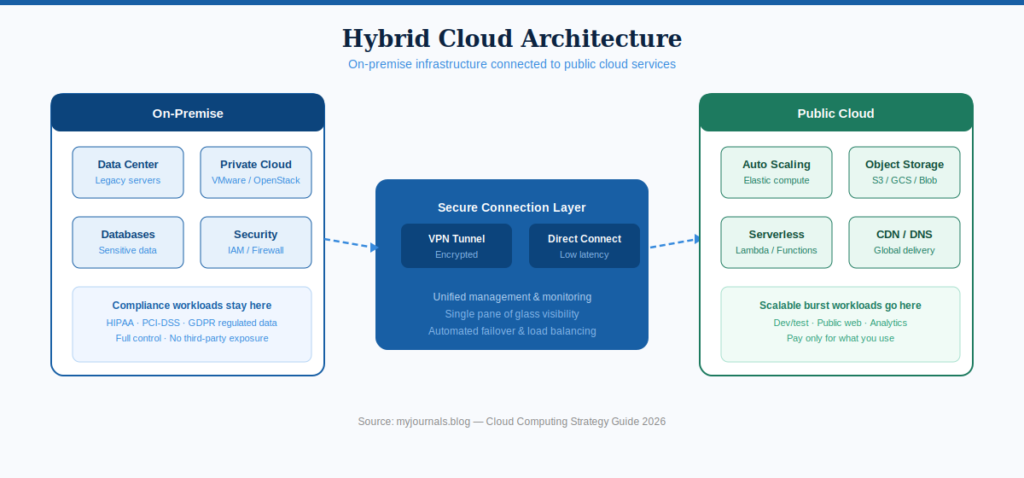
Simple explanation: When you adopt a hybrid cloud computing approach, part of your technology will remain on computers in your own building and some will be in the cloud. They both function as a single connected entity.
Real example: General Electric (GE) runs one of the most cited enterprise hybrid cloud deployments. GE migrated customer-facing applications and analytics workloads to AWS while keeping core manufacturing control systems and regulated industrial data on premises. The result was a 50% reduction in time-to-market for new digital products while maintaining the strict data residency requirements its industrial contracts demand. The on-premises and cloud environments run as a single unified system their engineers do not think about where a workload lives, they think about what it needs to do. Gartner predicts 90% of organizations will adopt hybrid cloud by 2027.
Here is how to build a hybrid cloud computing strategy that works:
Step 1: Classify Every Workload Before Touching Anything
A workload is any task your computer systems perform. Processing payroll is a workload. Running your website is a workload. Generating quarterly reports is a workload.
Before moving anything anywhere, evaluate each workload across four dimensions:
Sensitivity: Does this activity involve work on medical records or financial information, or any personal information that concerns customers, or that is subject to privacy regulations? These frequently must remain on your own, controlled, computers without any legal or physical control.
Speed requirements: Does this application require milliseconds response time? Control systems in industries, real time trading platforms, and some manufacturing systems require responses that are so quick that the time lag in transmitting information to a cloud service provider and reclaiming it poses actual operational issues.
Demand variability: Is there a steep usage at some point and a decline at others? Retail sales on holidays. April tax platforms. Friday evening streaming. Cloud can do these just right since it expands automatically when demand surges and contracts into a smaller size when the demand decreases, and you only pay what you actually utilized.
Cost consistency: Does this workload run at identical levels around the clock every day of the year without variation? For these steady predictable workloads, owning dedicated hardware can sometimes be more economical than paying continuous cloud rental fees.
The result of this exercise is a clear map showing what belongs on premises, what belongs in the cloud, and why each decision was made.
Step 2: Design the Connection Between Both Environments
The connection between your building and the cloud is the most critical technical decision in any hybrid cloud computing strategy. A poor connection makes everything slow, unreliable, and frustrating.
VPN connection: An encrypted tunnel through the regular internet. Affordable and relatively quick to set up. Works well for many organizations. The limitation is that it shares bandwidth with all your other internet traffic which can cause slowdowns during busy periods.
Dedicated private connection: AWS Direct Connect, Azure ExpressRoute and Google Cloud Interconnect are services that offer you a physical line that is privately connected, and does not go through the public internet at all. Swifter, safer, quicker. More expensive and time consuming to set up. It is virtually always worthwhile to make the investment in organizations that have business applications that are critical and which are running on this connection.
You also need unified identity management. One system that controls who can access what across both environments. Microsoft Entra ID and Okta are the most widely used tools. When someone joins your company they get one account that works everywhere. When they leave, one cancellation locks them out of everything simultaneously.
Step 3: Standardize Your Tools Across Both Environments
The costliest error when it comes to hybrid cloud is the utilization of entirely dissimilar tools to oversee cloud and on premise infrastructure. Two systems are learned by your team. In between them, security gaps open up. At 2am, an incident response needs to change to entirely different dashboards when something breaks. Use tools that work across both environments from day one:
Terraform for infrastructure management. You describe what you want in code and Terraform creates it in whichever environment you specify, cloud or on premises, from one consistent interface.
Datadog or Dynatrace for monitoring. One dashboard showing everything happening across both your cloud and on premises environments simultaneously.
Unified security platform provides one view of your security posture regardless of where your workloads run.
Step 4: Write Governance Rules Before Anyone Starts Working
Governance means clear written rules that prevent the chaos that comes from hundreds of people making independent cloud decisions without alignment. Your governance rules must answer: Who is allowed to create cloud resources and spend company money? What labels must every cloud resource carry so you know who created it, which project it belongs to, and what its budget is? What is the first response procedure when a security incident occurs?
Automate as many rules as possible. Tools like AWS Service Control Policies, Azure Policy, and Open Policy Agent can automatically block actions that violate your rules and alert the relevant teams instantly.
Step 5: Define Success Metrics Before Migration Starts
Before anything moves, write down specific goals which are measurable. Examples: reduce cloud expenditure by a quarter in 24 months. New features being rolled out in two days, rather than two weeks. Zero security misconfigurations within 12 months. Check these after every quarter. In case you miss them, research truthfully and correctly. When you strike them, lift up the bar.
The single most important lesson in hybrid cloud computing strategy: Standardize security, monitoring, and governance BEFORE migrating a single workload. Every organization that skips this spends two to three times longer and three to five times more money fixing the resulting mess afterward.
6. Cloud Computing Migration Strategy:
The 6 Rs Framework:
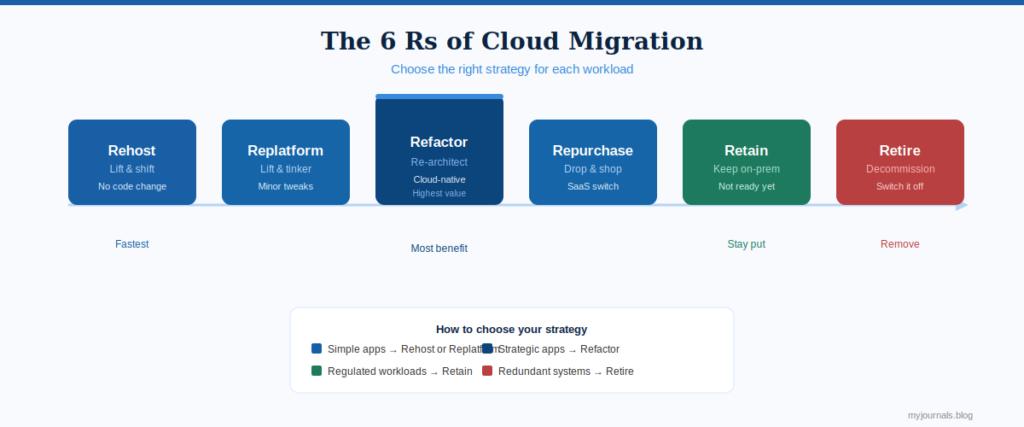
A cloud computing migration strategy is the specific technical plan for moving your existing programs, files, and systems to the cloud. The global standard for this planning is the 6 Rs framework, originally developed by Gartner and now used as the foundation of migration guidance by AWS, Azure, and Google Cloud.
Think of the 6 Rs like sorting your belongings before a home move. Some things you pack and move as they are. Some you repair before moving. And some you completely replace. Some you throw away entirely.
R1: Rehost (Lift and Shift). Move the application to a cloud server with zero changes. Same code, same configuration, just a different physical computer. This is the fastest option and typically reduces infrastructure costs by 20 to 30% immediately. The important caveat: rehosting is your starting point, not your destination. You gain almost none of cloud’s powerful capabilities until you optimize further. Plan to revisit every rehosted workload within 12 months.
R2: Replatform (Lift, Tinker, and Shift). Move the application with a small number of targeted improvements made during the migration. The most common example is moving your database from a server you manage yourself to a fully managed cloud database service. Same database technology your team already knows, but now the provider handles backups, updates, and security patches automatically. You get meaningful benefits without a major rebuilding project.
R3: Refactor (Re architect). Completely rebuild the application using modern cloud native technology: containers, microservices, serverless functions, event driven architecture. The most powerful option. Delivers dramatically better performance, reliability, and long term cost efficiency. Also the most expensive and time consuming. Reserve this for your most critical, highest traffic applications where the investment pays back clearly over three to five years.
R4: Repurchase (Drop and Shop). Cancel your existing application and replace it with a ready made cloud service. Replace your on premises customer system with Salesforce. Also your email server with Microsoft 365 or Google Workspace and your file storage with SharePoint or Google Drive. You eliminate maintenance permanently and the vendor handles everything going forward.
R5: Retain (Keep It Where It Is). Some applications genuinely should not move to the cloud right now. Regulatory requirements that mandate on premises storage. Migration cost exceeds benefit. Application scheduled for full replacement within 18 months anyway. A strong cloud computing migration strategy is honest about what should stay. Moving everything for the sake of moving everything is not a strategy.
R6: Retire (Switch It Off). During your workload inventory you discover applications nobody actually uses anymore. They run ,cost money and produce nothing. Decommission them. Most organizations discover during their first thorough inventory that 15 to 20% of their application portfolio is actively unused or completely duplicated. Retiring these generates immediate cost savings with zero technical risk.
The Three Migration Phases
Phase 1: Build the Foundation (Months 1 to 3). Establish your complete cloud environment before anything migrates into it. Network architecture, security baselines, access controls, monitoring systems, governance policies, cost management tools. All of this must be complete and verified before a single production workload enters. Do not skip this. Organizations that do spend years fixing the resulting problems at three to five times the cost of doing it right the first time.
Phase 2: Pilot With Small Applications (Months 3 to 6). Migrate two to four low risk, non critical applications first. Use these as real learning experiences. Where did actual costs differ from your estimates? Where did the process break down? What did your team not understand before starting? Fix your process, tools, and documentation based on what you learn before scaling.
Phase 3: Migrate at Scale (Months 6 to 24). Apply your tested and refined process to the rest of the portfolio in organized waves. Always migrate applications that communicate with each other in the same wave. Splitting dependent applications across separate waves creates integration failures that are expensive and time consuming to untangle.
7. Federal Cloud Computing Strategy and DoD Cloud Computing Strategy
These frameworks belong in every cloud strategy guide because they represent cloud adoption solved under the most extreme conditions possible. The lessons apply to any organization.
The Federal Cloud Computing Strategy
The US federal government manages technology for hundreds of agencies, millions of employees, and billions of sensitive records. In 2019 they published their official approach called Cloud Smart, updating the simpler Cloud First mandate from 2011.
The original Cloud First policy told agencies to move to cloud as fast as possible. Agencies moved things to the cloud without proper security evaluation, without trained staff, without efficient purchasing. Predictable problems followed.
Cloud Smart corrected this with three pillars:
Security before speed. Every cloud provider used by a federal agency must pass FedRAMP authorization, a rigorous security assessment covering hundreds of specific controls. The business lesson: require documented security certifications from cloud providers before signing contracts. Do not trust marketing claims.
Make the right path easy. Original procurement rules were so complicated that buying a cloud service took two years to approve. Cloud Smart simplified this dramatically. The business lesson: if your internal approval process for new cloud tools takes months, your teams will bypass it through unauthorized tools and create the exact security risks you were trying to prevent.
Invest in your people. The federal cloud computing strategy officially made workforce training mandatory across all agencies. The business lesson: your strategy fails if only five people in your organization understand cloud. Training is not an optional line item.
The Department of Defense Cloud Computing Strategy
The Department of Defense cloud computing strategy is the most rigorous cloud framework that exists anywhere in the world. The DoD manages classified military intelligence, global operational logistics, and communication systems that must function reliably under hostile conditions. Failure means national security consequences.
The JEDI to JWCC evolution: In 2017 the DoD launched JEDI, the Joint Enterprise Defense Infrastructure program. The plan was to award one massive cloud contract worth up to $10 billion to a single provider. Microsoft won in 2019. Amazon and Oracle immediately filed legal challenges. The contract remained tangled in litigation for years while DoD cloud needs continued growing urgently.
In 2021 the DoD cancelled JEDI entirely. The single vendor approach had failed completely.
They released JWCC in 2022 (the Joint Warfighting Cloud Capability) with contracts being awarded to Amazon Web Services, Microsoft Azure, Google Cloud, and Oracle Cloud at the same time. Four providers that compete on each task order. There is no one company that has everything.
The four principles of the department of defense cloud computing strategy that every organization should adopt:
Mission outcomes first. All cloud decisions should enhance the capability of operations directly. Technology in itself is rejected. As a business: any cloud investment should be linked to a quantifiable business outcome. In the event that you are not able to identify the business outcome, do not sanction the spending.
Zero Trust security. The DoD issued its Zero Trust Strategy in 2022 making Zero Trust the mandatory security standard for all cloud environments. Zero Trust means no user and no device is ever automatically trusted regardless of location. Every access request gets verified every single time. This is better security for any organization in any industry, not just defense.
Classify your data. The DoD classifies all data according to Impact Levels IL2 to IL6, according to the sensitivity and the result of exposure. In the case of businesses the equivalent is the establishment of data levels: publicly available, internal, confidential, and restricted. Then implementing strict regulations on the cloud systems that each level is permitted to utilize. This is not done in a systematic manner by most businesses and the outcome is sensitive data that is all over cloud services without reasonable controls.
Never depend on one vendor. The JEDI failure made this principle permanent in the department of defense cloud computing strategy. Build your architecture so that moving workloads from one provider to another is a manageable project rather than a catastrophic undertaking.
8. Cloud Computing Implementation Strategy:
The Execution Framework
A cloud computing implementation strategy is where all your planning turns into real running systems. Here is the five step execution framework used by organizations that consistently get cloud right.
Step 1: Create a governance team with real authority. Create a Cloud Center of Excellence, an interdisciplinary team of cloud architects, security engineers, finance representatives, and business leaders. This team establishes standards, adjudicates, passes key decisions, and is directly responsible for strategy outcomes. The absence of a team that has authority and accountability renders the strategy documents as shelfware.
Step 2: Build your landing zone completely before migrating. A landing zone is the pre configured, secured cloud environment established before any production workloads arrive. It includes network architecture, security baselines mapped to your compliance framework, centralized monitoring and logging, access control structures, and a pre approved service catalog that teams can use without individual approvals for every action. Build it. Verify it. Then and only then start migrating.
Step 3: Define success metrics before anyone starts migrating. Specific measurable goals written down before migration begins are the only way to know whether your cloud computing implementation strategy is actually working. Good metrics include cloud spending as a percentage of revenue, deployment frequency, mean time to recovery from incidents, percentage of workloads meeting SLA targets, and security misconfiguration count. Review quarterly. Adjust based on data.
Step 4: Train your people as seriously as you train for anything else. Budget for cloud certifications including AWS Solutions Architect, Microsoft Azure Administrator, and Google Cloud Professional. Create hands-on practice environments where engineers experiment safely before touching production. Build internal knowledge sharing sessions. The most complex cloud computing implementation strategy in the world fails if the people executing it do not understand what they are doing.
Step 5: Review and improve every quarter without exception. Run a formal Well Architected Review every 6 to 12 months using the frameworks published by AWS, Azure, or Google Cloud. These evaluate your cloud environment across cost optimization, security, reliability, performance efficiency, and operational excellence. Treat the findings as a prioritized improvement backlog. Work through it systematically. Cloud is a discipline that matures continuously, not a project that concludes.
9. Biggest Mistakes That Kill Cloud Strategies
Migrating before the foundation is ready. Teams hasten to display apparent progress and pass the landing field. They use the next two years and three to five times greater funds in repairing security holes and governance loopholes that would have been avoided completely had they taken the proper precautions during the month before.
Rehosting everything and declaring victory. Lift and shift migration is a starting point, never a destination. Organizations that move everything without optimizing pay cloud fees without gaining cloud benefits. Set a firm policy: every rehosted workload gets reviewed for optimization within 12 months of migration.
Nobody owns the cloud spending. In the absence of any individual or team responsible for incurring cloud expenses, expenditures become unlimited and opaque. Minor expenses in hundreds of departments add up to millions of dollars a year. Adopt FinOps: provide teams with real time spending dashboards and make them responsible about their numbers.
Treating the cloud as a technology project only. Cloud changes how engineers write code, how security teams work, how finance tracks costs, and how managers make decisions. If you invest only in technology and ignore the human side of this change, teams resist it, create workarounds, and revert to old habits under pressure. Budget for change management as seriously as you budget for technology.
Building everything in one region. Single region architecture creates one point of failure. Major cloud providers including AWS have experienced significant regional outages that took down organizations with everything in that one region. Multi region architecture costs 20 to 40% more. One major outage that takes your business offline for a day costs far more than that difference accumulated over years.
No plan for getting out. Virtually all the organizations strategize on how to migrate into a cloud provider. Practically no one has a strategy on how to leave. Strong reliance on proprietary tools of a single provider gives the latter indefinite bargaining power when it comes to renewing the contract. Adopt open standards and container based architectures so that you can always move, without necessarily doing so.
10. Cloud Strategy Comparison Table 2026
| Strategy | Best for | Effort | Time to value | Key benefit |
|---|---|---|---|---|
| Cloud first | Orgs with heavy legacy tech | Low–Medium | 6–12 months | Stop accumulating old infrastructure debt |
| Cloud native | SaaS & software vendors | High | 12–24 months | Maximum scalability and speed |
| Multi-cloud | Large enterprises | High | 12–18 months | No vendor lock-in, best tool for each job |
| Cloud optimization | Orgs 12+ months in cloud | Medium | 30–90 days | 20–35% cost reduction without major changes |
| Hybrid cloud | Regulated industries | Medium–High | 6–18 months | Control + flexibility in one model |
11. FAQs:
People Also Ask
What is a cloud computing strategy?
A cloud computing strategy is a formal written plan defining how your organization will adopt cloud technology, manage it daily, and use it to achieve business goals. However, it answers six questions before anything moves: why, what, where, how, when, and who. Without this plan, cloud adoption costs 35% more than it should and delivers half the value it could.
What is the difference between a cloud strategy and a cloud migration strategy?
A migration cloud strategy is the complete master plan covering your entire cloud journey including governance, security, cost management, and long term direction. A cloud computing migration strategy is the specific technical plan for moving your existing applications to the cloud. Migration strategy is one important component within the broader cloud strategy, the same way a moving plan is one part of a complete city relocation plan.
What is the federal cloud computing strategy?
The federal cloud computing strategy, officially called Cloud Smart, is the US government's framework guiding cloud adoption across all federal agencies. Published in 2019, it is built on three pillars: security through FedRAMP authorization requirements before any cloud adoption, smarter procurement through simplified purchasing processes, and workforce investment through mandatory training. Its core lesson is that moving fast without security foundations and trained people creates more problems than it solves.
What is the Department of Defense cloud computing strategy?
The DoD cloud computing strategy is the military's framework for cloud adoption in national security operations. It evolved from the cancelled single vendor JEDI contract to the current multi vendor JWCC approach using Amazon, Microsoft, Google, and Oracle simultaneously. Its principles include Zero Trust security architecture, data classification by Impact Level, mission outcome driven decisions, and deliberate resilience through multiple vendors. It is the most rigorous cloud framework in existence.
How do you build a hybrid cloud computing strategy?
Building a hybrid cloud computing strategy requires five steps in order. Classify every workload by sensitivity, speed requirements, demand variability, and cost pattern. Design secure network and identity connections between on premises and cloud environments. Standardize management and monitoring tools across both environments. Write governance rules covering who can create resources, how costs are tracked, and how incidents are handled. Define specific measurable success metrics and review them quarterly without exception.
What are the 6 Rs of cloud migration?
The 6 Rs are the global standard framework for deciding how each application should be handled during cloud migration. Rehost means move as is with no changes. Replatform means move with minor improvements. Refactor means completely rebuild using cloud native technology. Repurchase means replace with a ready made cloud service. Retain means deliberately keep on premises. Retire means decommission because nobody uses it anymore. Every application in your portfolio should be assigned one of these six approaches before migration begins.
How long does cloud computing strategy implementation take?
A realistic cloud computing implementation strategy takes 18 to 36 months for a medium to large organization to migrate the majority of planned workloads and reach stable operations. The first three to six months go entirely to foundation building including governance, landing zone, security, and team training. Organizations that rush this phase consistently encounter more expensive problems afterward than the time they saved by moving faster. Small organizations can sometimes complete initial implementation in 6 to 12 months.
What is FinOps in cloud strategy?
FinOps stands for Financial Operations. It is the practice of managing cloud costs with the same discipline and accountability applied to engineering or security. The core practice is giving the teams that create cloud resources real time visibility into the costs those resources generate and holding them accountable for staying within budget. Apptio's 2024 report found organizations with mature FinOps practices reduce wasted cloud spending by an average of 30% in their first year of implementation.
Deep Dive: Cost Optimization
Cloud strategy requires attention to cost management. Dive deeper into cost optimization with this detailed guide:
→ Cloud Cost Optimization Playbook 2026
7 proven strategies to cut cloud costs by up to 90% with real-world examples and step-by-step implementation.
12. Conclusion and Key Takeaways
Cloud computing strategies in 2026 are not optional. They are the single biggest factor determining whether your cloud investment delivers competitive advantage or quietly drains your budget while delivering minimal measurable results.
The organizations getting cloud right in 2026 share three consistent habits. They plan thoroughly before acting. And govern rigorously throughout. They treat cloud as a permanent operational discipline that continuously improves rather than a project with a completion date.
Key Takeaway 1: Pick the strategy that fits your actual reality today. A hybrid cloud computing strategy fits most large enterprises. Cloud native fits software companies. Cloud optimization is the right priority for anyone already in the cloud and overspending. Honesty about where you are beats optimism about where you wish you were every single time.
Key Takeaway 2: Security, governance, and people are not supporting activities for your cloud strategy. They are the strategy. Both the federal cloud computing strategy and the department of defense cloud computing strategy prove at the highest possible stakes that foundations built before migration always outperform foundations retrofitted afterward.
Key Takeaway 3: A cloud computing implementation strategy never finishes. The organizations generating the most value from cloud today started treating it as a continuous improvement discipline three to five years ago. Start now. Begin with those six foundational questions. Write honest answers. That is where every cloud computing strategy that actually delivers results begins.
